

Employee Stats, Leveling, and Usage
Employee Stats
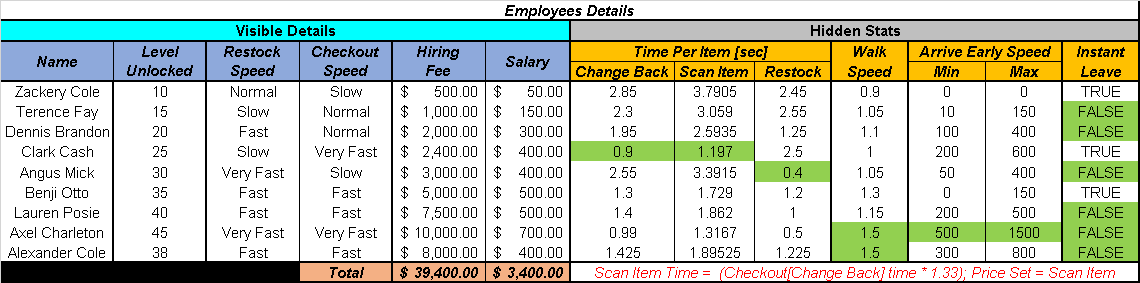
As of v0.66, employees have different base speeds for stocking, checking out customers, setting prices, and other tasks. For time-based stats, lower values are better.
Time-Based Stats
| Stat | Description |
|---|---|
| Change Back | Time required to return each piece of change. |
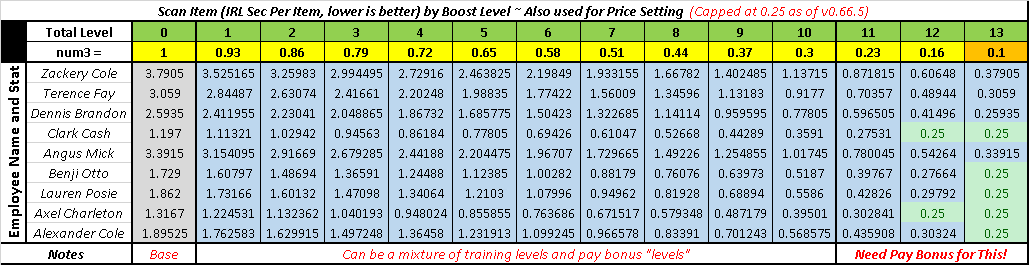
| Scan Item | Time required to scan an item or card. Scan Time = Change Back Time × 1.33. |
| Price Set | Time required to adjust item or card prices. Price Set time is equal to Scan Item time. |
| Restock | Time required to place an item on a shelf, packs in POMs, a card on a table, or a bottle in a spray machine. |
Other Stats
| Stat | Description |
|---|---|
| Walk Speed | Factor affecting walking speed. Higher is better. |
| Arrive Early Speed | Adjusts the employee’s random spawn point so they can arrive at work sooner. Higher is better. |
| Instant Leave | If TRUE, the employee leaves immediately when 9 PM hits. FALSE is preferable for register duty because the employee stays until the last customer leaves. |
Employee Hiring and Bills
You need to have 8 employees hired at the same time to obtain the achievement. Afterward, the number of employees you keep is up to you.
Employee salaries accumulate each day if they remain unpaid. When the game first shows the payment as “due”, a 7-day countdown begins. After that period, the payment becomes “past due” and another 7-day countdown begins.
After a total of 14 days, the entire accumulated amount for those 14 days is automatically deducted from your funds, regardless of whether you have enough money.
The same occurs with the electricity bill and store rent.
If an automatic payment leaves you in debt, the game can potentially become soft locked if you cannot earn enough money from selling your current items, cards, and furniture to keep the shop operating.
Currency Conversion
Employee values listed in the tables use USD. Other currencies convert as follows:
| USD | Equivalent |
|---|---|
| 1 USD | 1 EUR |
| 1 USD | 1 GBP |
| 1 USD | 1 CAD |
| 1 USD | 100 JPY |
| 1 USD | 2.5 CNY/RMB |
| 1 USD | 2 AUD |
| 1 USD | 2 MYR |
Choosing and Using Employees
Clark and Angus are the first employees with Very Fast skills.
Terence can be useful for early checkout while you handle restocking.
If checkout lines become too long, consider getting another register and hiring an employee to handle it. Similarly, if shelves are empty, consider hiring an employee to handle restocking.
When you tell an employee to restock shelves and they ask for confirmation, answer NO. Otherwise, they will restock items into open shelf spaces.
Training Employee Skills
You can train employee skills before opening the shop by repeatedly performing certain tasks. With enough funds and patience, the following training can be done during one morning.
Restock Shelf
Throw boxes from warehouse shelving onto the ground and allow employees to put them back onto the shelf.
Set Price
After employees finish setting prices, save and reload the game. They should go through the process of setting the prices again.
Refill Scent
Buy an Auto Scent M100 for $500 and place it in the shop. Allow an employee to refill it, then box the machine and resell it for $250.
Boxes containing extra bottles that are returned to a warehouse shelf between M100 machines can also provide experience.
Pack Machine
Allow an employee to fill the POMs while you empty them and purchase more packs.
Restock Card
Remove cards from your tables and place them back into the storage box. Allow the employee to restock the tables again.
If the Set Price subtask is enabled, the first time the employee sets the price of the cards can also provide experience toward the Set Price skill.
Man Counter
Man Counter cannot be trained through these methods because it requires customer transactions.
Pay Boosts
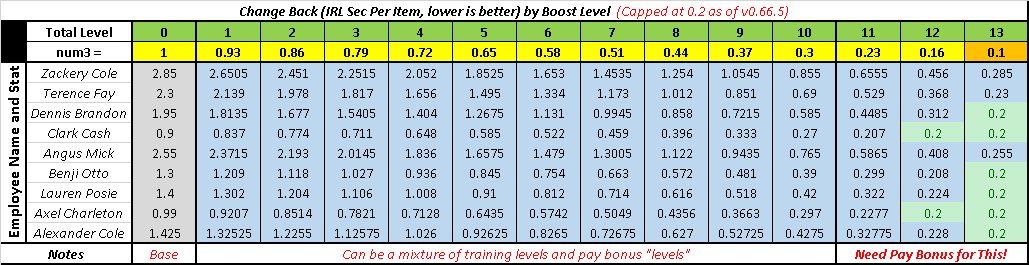
Giving an employee one pay boost makes them work somewhat faster and gives them double experience for the day.
Pay boosts reset at the end of the day, and an employee can have up to 3 pay boosts.
Each pay boost provides a temporary level in all skills for the day, helping the employee work faster.
Pay boosts can also make certain employees stay somewhat later than they otherwise would, including Zack, Clark, and Benji. For example, Clark will not leave his register while a line is still present.
The temporary levels provided by pay boosts are not displayed in the main skill section of the employee information screen. They are applied in the background.
Pay boosts also provide a small increase to walking speed.
Employee Skill Leveling
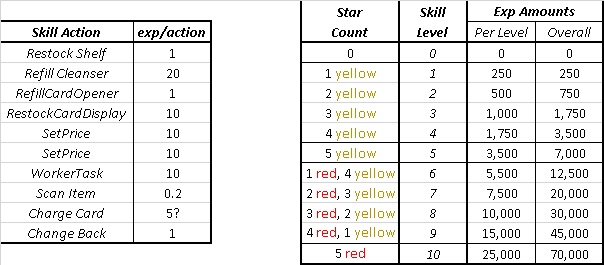
As employees perform tasks, they gain experience for each action and can level up the corresponding skill. Each skill level reduces the time required to perform that action.
The task level has a maximum of 10 and is represented by stars on the employee information screen:
- Levels 1 through 5 are represented by yellow stars.
- Levels 6 through 10 are represented by red stars, which replace the yellow stars.
Workers level up at different rates because their base speeds differ.
Each restock type is leveled independently and has its own speed:
- Items
- Cards
- Spray machines
- POMs
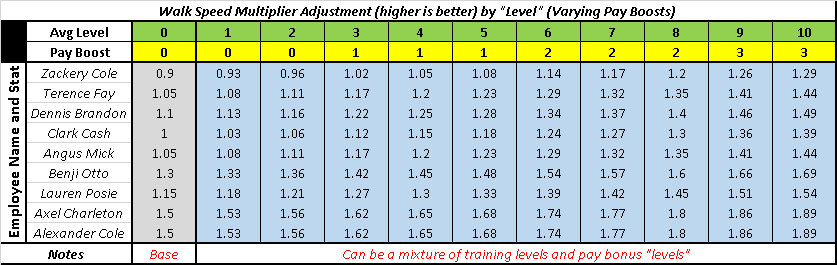
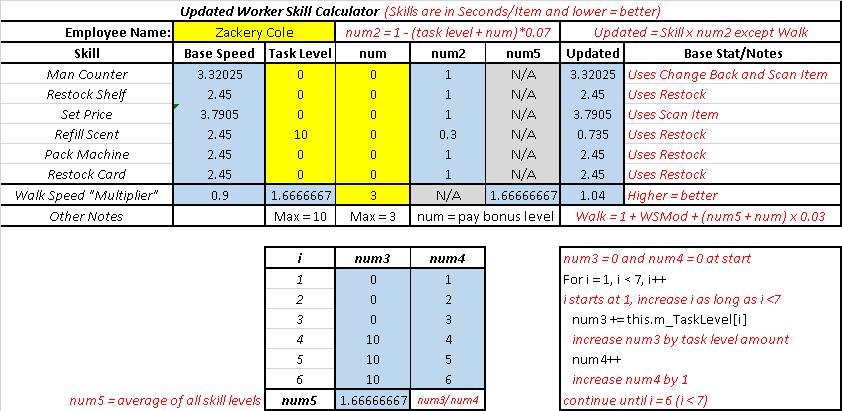
Skill levels remain useful even when an employee is not always performing a particular task because walking speed is improved based on the average level of all skills.
Skill Improvement Formula
The employee improvement system uses the following formula:
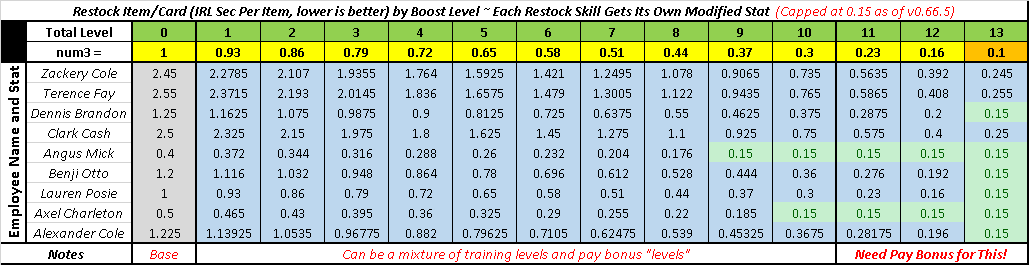
Modified Stat = Base Stat × Modifier
Modifier = 1 − (Task Level + Pay Boosts) × 0.07
Where:
- Modified Stat is the reduced time per action.
- Base Stat is the base time per action.
- Task Level is the employee’s current level in that skill.
- Pay Boosts is the number of active pay boosts.
For example, if Angus has a Restock Shelf skill at level 4 and a base stat of 0.4 seconds per action:
Modified Stat = 0.4 × (1 − (4 + 0) × 0.07)
Modified Stat = 0.4 × 0.72
Modified Stat = 0.288 seconds per action
At maximum task level with all 3 pay boosts, the formula gives:
1 − (10 + 3) × 0.07 = 0.09
This would reduce the skill to 9% of its base timer, but the reduction is capped at 10% of the base timer.
Skill Improvement Limits
Skill increases are capped in two ways:
- There is a general time cap for each skill, which varies by skill.
- “Level” 13, consisting of 5 red stars and 3 pay boosts, caps the reduction at 10% of the base timer.
All other levels provide a 7% reduction, while the final level provides a 6% reduction.
Walking Speed Improvement
Employee walking speed also improves as their skills increase, but at a slower rate.
The walking speed improvement uses the following formula:
Improved Modifier = Base Modifier + (Average Skill Level + Pay Boosts) × 0.03
The increase is based on the average level of all skills rather than the level of a single skill.
Pay boosts also contribute to walking speed.
Experience and Skill-Specific Leveling
Experience is gained from individual actions, and the relevant skill is improved according to the task being performed.
The WorkerTask experience appears to come from boxes being put back into storage. This experience is applied to the active skill associated with the box being put away.
The Set Price subtask of Restock Card applies experience to the Set Price skill when card prices are updated, allowing both skills to level from the same action. The price-setting action triggers the first time the employee puts out the card.
Each restock type is leveled independently for its own restock speed.
Workers level at different rates because their base speeds differ.

Be the first to comment